


Meta’s Muse is one of the clearest signs yet that consumer AI is moving beyond chat. Launched in the United States on September 8, 2026, the Meta Muse AI agent is designed to keep working after you leave the app, connect to services you already use, browse websites, fill out forms, send emails with approval, make purchases, and help manage longer-term goals.
That makes Muse more ambitious than a standard chatbot, but it also raises a harder question: how much access should an AI agent have to your inbox, calendar, accounts, payments and personal preferences?
This article separates the launch claims from the practical details. It explains how the Meta Muse AI agent works, what it can do, how much it costs, where it is available, what Meta says about privacy and security, and what early users should consider before handing an autonomous agent real permissions.
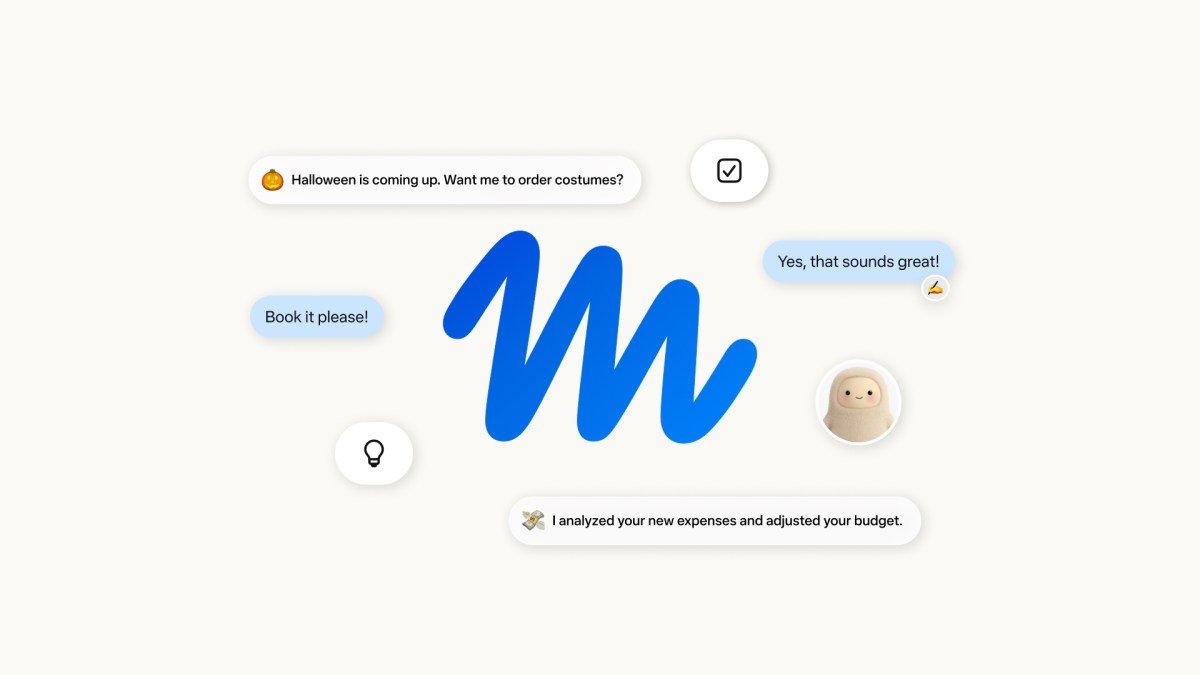
What is the Meta Muse AI agent?
Meta describes Muse as a personal AI agent rather than a chatbot. The distinction matters. A chatbot normally responds when you ask a question. Muse is designed to take a goal, make a plan, use tools, perform actions and continue working in the background.
According to Meta’s launch announcement, Muse can open a browser, fill out forms, negotiate on a user’s behalf, connect to third-party services and return when it needs approval. It runs on a dedicated cloud computer called Muse Secure VM and is powered by Meta’s Muse Spark model.
At launch, Muse is rolling out only in the United States to adults. It is available on iOS, Android, the web at muse.ai and through WhatsApp. Meta says support for its AI glasses is coming later.
Meta Muse AI agent at a glance
| Feature | Current launch detail |
|---|---|
| Product type | Personal AI agent |
| Launch date | September 8, 2026 |
| Initial market | United States |
| Age requirement | 18+ |
| Access | iOS, Android, muse.ai, WhatsApp |
| Underlying model | Muse Spark |
| Execution environment | Dedicated Muse Secure VM |
| Background work | Yes |
| Browser use | Yes |
| Email/calendar connections | Yes, with user-controlled permissions |
| Payments | Stripe Link at launch; Shop Pay planned |
| Free tier | Yes |
| Paid plans | Power and Maximum reported at launch |
| Reported prices | $20/month and $100/month |
| AI glasses | Coming soon |
What can the Meta Muse AI agent actually do?
The biggest selling point is not that Muse can answer better questions. It is that Muse is supposed to complete multi-step tasks that normally require several apps.
Meta gives examples such as booking travel, sending email, selling a car, lowering a bill, adjusting a training plan, creating grocery lists from saved Instagram content and coordinating plans around a user’s schedule.
For longer jobs, Muse can continue running after the app is closed. If it reaches an action that requires permission, such as sending a message or making a purchase, it is designed to return to the user for approval.
This changes the normal AI workflow. Instead of sitting in a chat window and repeatedly prompting an assistant, you can hand off a task and wait for an update. That is the same direction the broader AI industry is taking with coding agents, cloud browsers and tool-using assistants.
Meta’s technical security documentation also says Muse can create custom connectors for services that expose APIs or command-line interfaces. When a dedicated integration is not available, the product can use its browser to interact with a website.
Why Muse Secure VM matters
A personal agent is only useful if it can access useful information. The problem is that useful information is often sensitive.
Meta’s answer is Muse Secure VM. Each user gets a dedicated Linux virtual machine in Meta’s cloud. The VM contains a browser, storage, compute resources and the user’s connected data. The main Muse agent runs inside an isolated runtime environment instead of receiving unrestricted control over the host system.
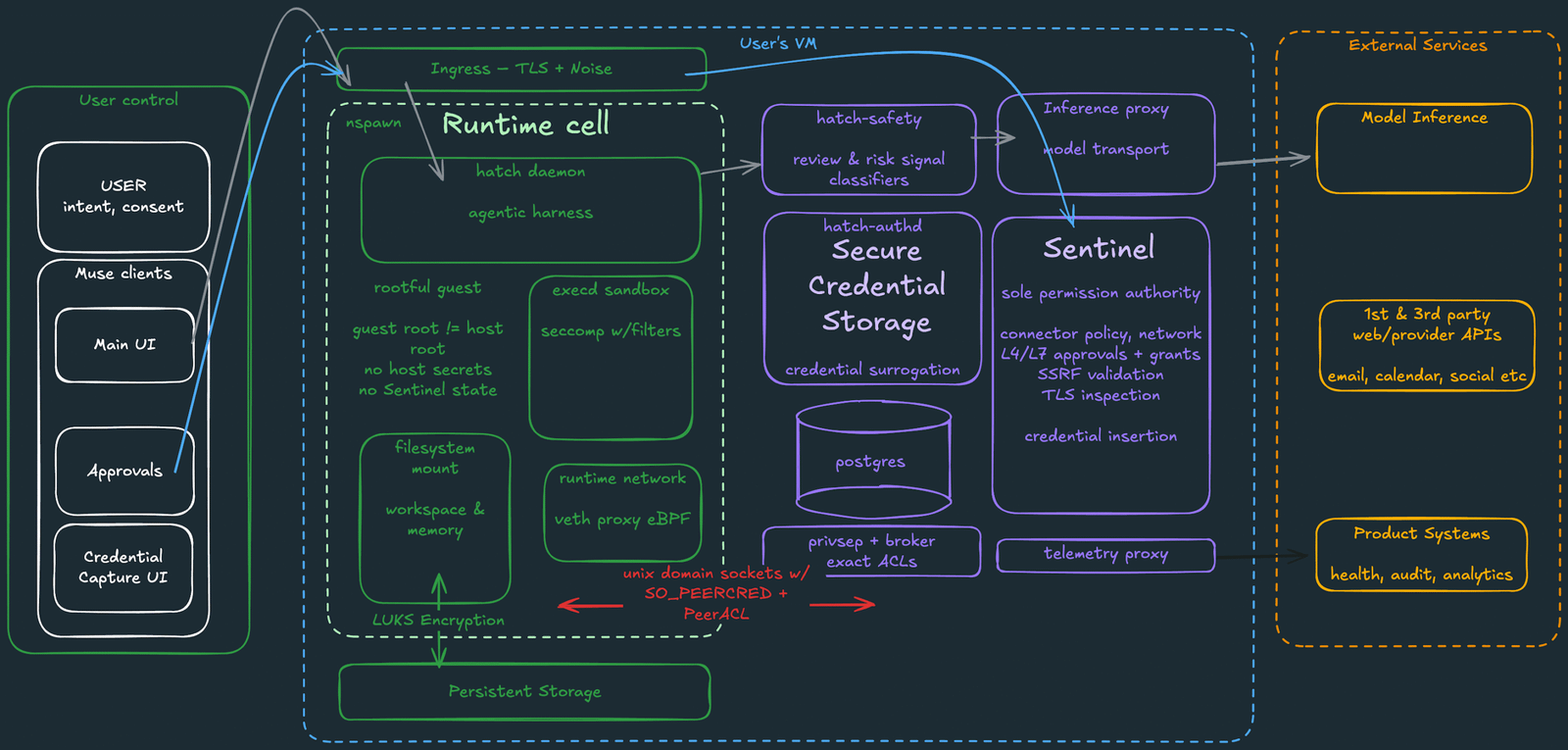
Meta’s engineering post says the runtime uses Linux isolation, filtered system calls, restricted kernel capabilities and separate security-sensitive services. It also separates credential handling from the model itself.
The practical idea is simple: Muse can use a credential without necessarily seeing the real secret. Meta says OAuth tokens and other credentials are stored by a separate authentication service. The agent works with surrogate credentials, while real secrets are inserted only at the network boundary after a request is authorized.
That design is meant to reduce the chance that a prompt-injection attack can simply trick the model into revealing a password or API token.
What is Sentinel in Meta Muse?
Sentinel is one of the most important parts of Muse’s security design. Meta describes it as a separate host-side agent that acts as the permission authority for connector actions and network access. Muse can propose an action, but Sentinel decides whether it is allowed, denied or needs the user’s approval.
That separation matters because AI agents process untrusted information. A malicious email, webpage or document can contain text designed to manipulate an agent. This class of attack is commonly called prompt injection.
If Muse reads a hostile webpage telling it to ignore the user and send data elsewhere, the system is not supposed to rely only on the language model recognizing that instruction as malicious. Sentinel sits outside the main runtime and controls connector permissions and network egress.

Meta openly acknowledges that Muse can still make mistakes. Its security team says the product was hardened through internal use, agentic red teaming and private bug-bounty testing, but it does not claim the risk has disappeared.
Meta has now opened the Muse bug-bounty program to the public. Its technical post says valid reports can receive up to $300,000, including up to $130,000 for successful prompt-injection attacks affecting one user.
Meta Muse privacy: what data can it access?
Muse is permission-based. Users decide which services to connect and what type of access the agent receives.
For an email connector, for example, a user may allow reading without allowing sending. Meta says users can revoke access later, disconnect services and review an audit trail of what Muse has done or plans to do.
Meta also says the main Muse agent does not see real passwords or payment methods; sensitive actions such as sending an email or making a purchase require approval; users can opt out of having Muse interactions used to train Meta’s AI models; data in a user’s Muse VM is not shared with Meta’s advertising systems; and users can tell Muse to forget specific remembered information.
Later in 2026, Meta plans to introduce a Confidential VM option. The company says that version will encrypt the whole VM with a key held by the user so even Meta would not be able to access the user’s data and Muse conversations.
That future feature could become an important differentiator, but it is not the standard launch architecture today.
Meta Muse pricing: free, Power and Maximum
Meta’s launch announcement says Muse is free for most everyday use and offers subscription plans for people who need more. Meta did not publish the full permanent price table in the main newsroom announcement.
TechCrunch reported two paid launch tiers: Power at $20 per month and Maximum at $100 per month.
| Plan | Reported launch price | Best fit |
|---|---|---|
| Free | $0 | Light everyday tasks |
| Power | $20/month | More frequent agent usage |
| Maximum | $100/month | Heavy users handing off many tasks |
The product includes a usage meter so users can see how much of their allowance remains. Because the paid prices were reported at launch rather than published as a permanent price table in Meta’s newsroom announcement, users should check the live Muse subscription screen before paying.
TechCrunch also reported that Muse requires a payment card to get started, even for free usage. That may be a point of friction for people who simply want to test the agent.
How payments work inside Meta Muse
Muse uses Stripe Link for checkout at launch. Meta says Link can generate a one-time-use card so a merchant does not receive the user’s actual card details.
Muse is also the first AI agent Meta says is covered by Link’s purchase protections for eligible transactions, including protections around damaged or lost items, price drops, no-fee returns and certain purchase guarantees.
Meta says Shop Pay support is coming, along with 1Password integration for credentials.
The key point is that Muse is not simply recommending products. It is being designed to move further down the transaction chain, from research to form filling to checkout. That makes approval controls especially important.
Is Meta Muse available outside the United States?
Not at launch. As of September 10, 2026, Meta says Muse is rolling out in the United States on iOS, Android, the web and WhatsApp. The company has not announced a firm India, UK, EU or wider international launch date in its official launch post.
For readers outside the US, this means claims that Muse is already globally available should be treated carefully. Meta says AI-glasses support is also coming soon, which could make Muse more useful for hands-free tasks once it expands beyond the initial rollout.
Meta Muse AI agent vs a normal chatbot
| Traditional chatbot | Meta Muse AI agent |
|---|---|
| Answers a question | Takes a goal and plans actions |
| Usually waits for the next prompt | Can continue working in the background |
| Mostly generates information or content | Can use tools, apps and a browser |
| User performs most external actions | Can propose and perform approved actions |
| Lower real-world action risk | Higher value, but higher permission risk |
This difference is why personal agents could become much more useful than chatbots, but also why their failure modes matter more. A hallucinated answer is annoying. A mistaken purchase, email or account change can have a real cost.
What Reddit users are already worried about
Early Reddit discussion around Muse is less focused on benchmark scores and more focused on trust.
A September 9 discussion in r/ArtificialInteligence highlighted Meta’s own acknowledgement that prompt injection remains a relevant threat for autonomous agents. The discussion questioned whether sandboxes and monitoring layers can fully solve the basic problem of giving an AI access to human-facing channels such as email and the open web.
That discussion is not evidence that Muse has been compromised in normal use. It is better understood as a snapshot of what technically minded users are asking immediately after launch: can an AI safely read untrusted content and still be trusted to take actions?
Meta’s architecture is clearly designed around that problem. The company assumes the model can be attacked and tries to limit what a successful manipulation can accomplish. That is a stronger security model than simply telling the agent to ignore malicious instructions, but users should still begin with minimum permissions.
How to use the Meta Muse AI agent more safely
If you get access to Muse, the safer approach is to increase permissions gradually.
- Start read-only where possible. Let the agent summarize a calendar before allowing it to create or cancel events.
- Separate reading from sending. Let it read relevant email before granting permission to send messages.
- Review approvals. Check the action, destination and scope instead of automatically accepting prompts.
- Keep payment checks manual. Verify the merchant, item, total and return terms before approving checkout.
- Be careful with untrusted content. Unknown attachments, suspicious websites and unfamiliar messages can contain hostile instructions intended for AI agents.
Meta’s security layers reduce risk, but the company itself says Muse can still make mistakes.
Why Meta Muse matters for the AI agent market
Muse matters because Meta has something most AI-agent startups do not: distribution.
The company can place an agent inside WhatsApp and eventually connect it more deeply with the social and device ecosystem used by billions of people. A personal agent does not need to win every benchmark if it is available where users already communicate and connecting services is easy.
At the same time, that distribution increases the trust challenge. An agent that can see personal conversations, use browser sessions and make payments requires a higher standard than a chatbot that only drafts text.
Recent coverage from Reuters, AP, Wired and TechCrunch, together with fresh Reddit discussion, shows that Muse has quickly become one of the most closely watched consumer-agent launches of the week.
For developers following the broader transition from models to agents, our GPT-6 Astra vs Claude Fable 5.1 comparison explains why tool use, harness design and agent execution are becoming as important as raw model intelligence. Our Hermes Agent installation guide shows the opposite approach: running an agent locally rather than trusting a large consumer platform with the execution layer. For a broader look at why real-world AI performance can change after launch, see our analysis of why AI models can appear to get worse over time.
Final verdict: should you try the Meta Muse AI agent?
For US users who are comfortable experimenting with AI agents, Muse is one of the most interesting consumer launches of 2026.
Its strongest feature is not a benchmark number. It is the combination of background execution, a dedicated cloud computer, app connections, browser control, approval flows and mainstream distribution through WhatsApp.
Its biggest weakness is also obvious: to become genuinely useful, Muse needs access to information and accounts that users normally protect carefully.
Meta has built a technically serious security architecture around that problem, including isolated VMs, separate credential handling, Sentinel-controlled permissions, network controls and a large bug bounty. Those protections are meaningful. They are not a guarantee that an autonomous agent will never make a bad decision or be manipulated by malicious content.
The best way to evaluate the Meta Muse AI agent is practical: start small, keep permissions narrow, verify sensitive actions and judge it by completed tasks rather than launch claims.
FAQ
Is Meta Muse free?
Meta says Muse is free for most everyday use. TechCrunch reported paid Power and Maximum launch tiers at $20 and $100 per month for heavier usage.
What model powers Meta Muse?
Meta says Muse is powered by Muse Spark, its model designed for real-world agentic work.
Can Muse send emails?
Yes, if the user grants the required permission. Meta says Muse asks for approval before sensitive actions such as sending an email.
Can Meta Muse make purchases?
Yes. At launch, Muse supports checkout through Stripe Link. Meta says one-time-use cards can keep a user’s real card details hidden from merchants.
Does Muse see my passwords?
Meta says the main Muse agent does not see real passwords or payment details. Credentials are stored separately and inserted when authorized network requests are made.
Is Meta Muse available in India?
No official India launch has been announced as of September 10, 2026. The initial rollout is US-only.
Is Muse safe from prompt injection?
No AI agent should be described as completely immune. Meta says it built Sentinel, isolation, credential separation and other defenses specifically because agents can encounter malicious data, and it is offering bug-bounty rewards for prompt-injection findings.
Sources: Meta Newsroom, Meta AI Research, TechCrunch, Reuters, and the linked Reddit discussion. See AI Tech Ledger’s Editorial Policy and Review Methodology for how we evaluate claims and sources.